
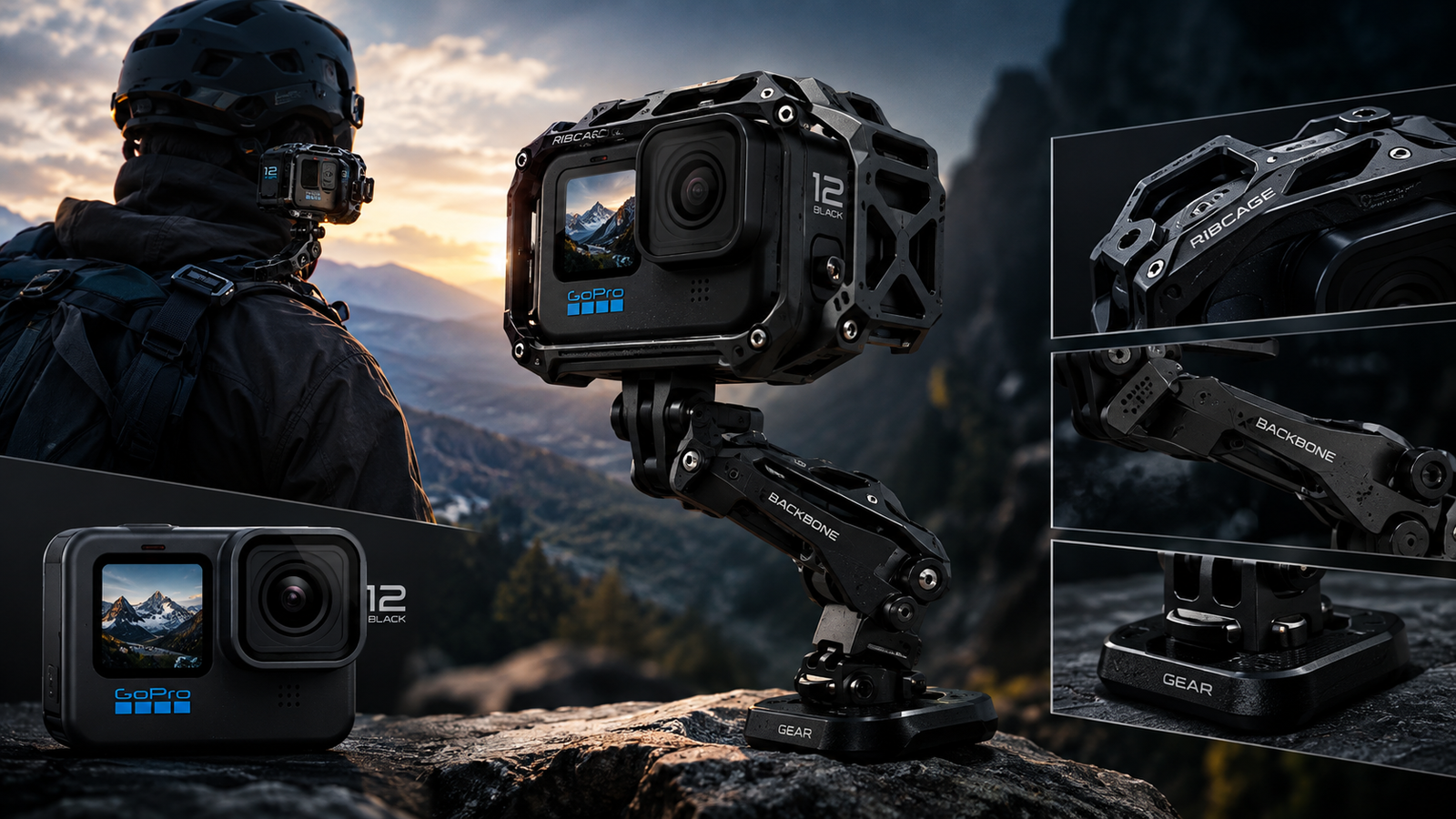
If you’ve ever felt boxed in by your GoPro’s fixed fisheye lens, you’re not alone. Action cameras are brilliant for wide, immersive shots, but the moment you want a macro close-up, a true telephoto shot, or cinema-style depth of field, the stock hardware runs out of road. That’s exactly the gap the Back-Bone Gear Ribcage H12PRO modified GoPro Hero12 Black was built to fill.
This isn’t a third-party case or a clip-on lens adapter — it’s a professionally re-engineered Hero12 Black with the internal optics stripped out and replaced with a proper lens mount. In this guide, we’ll break down what the H12PRO actually is, how it compares to a stock Hero12, which accessories (like the surprisingly handy 9.Solutions multi-tool for GoPro) you’ll want alongside it, and answer the practical questions every GoPro owner eventually asks — how long can a GoPro record, how do you charge the battery correctly, can it record sound, and how does underwater photography with GoPro change once you’ve modified the camera. By the end, you’ll know exactly whether this modified rig belongs in your kit.
1. What Is the Back-Bone Gear Ribcage H12PRO Modified GoPro Hero12 Black?
The Back-Bone Gear Ribcage H12PRO is a physically modified version of GoPro’s flagship Hero12 Black. Back-Bone takes the stock Hero12 Black, removes the built-in fisheye lens assembly to expose the image sensor underneath, and fits a dedicated mount so an external lens can be attached directly to the camera body. The company has been doing this kind of camera modification for over a decade, going all the way back to modified GoPro Hero3 and Hero3+ units built under the same “Ribcage” name.
What makes the H12PRO special is the sensor it’s built on. The camera uses GoPro’s Hero12 Black 5.3K, 27-megapixel sensor in a 1/1.9-inch, 8:7 aspect ratio format, and it accepts interchangeable C-mount, CS-mount, and S-mount (M12) lenses. That means you can fit a cost-effective C-mount lens for everyday shooting, or adapt a favorite SLR lens, vintage cine glass, or even a specialty optic depending on the shot you’re chasing.
2. Key Features and What's in the Box
Buy the fully built H12PRO and you get a complete kit, not just a camera with a hole where the lens used to be. A typical package includes the modified Hero12 Black body, an aluminum tripod mount, the original folding GoPro mount, a high-capacity battery, a 5mm C-mount ring, an M12-to-CS adapter, an M12 locking ring, a plastic C-mount cap, a charging cable, a curved adhesive mount, a mounting buckle, and a spare protective glass filter.
Beyond raw lens flexibility, the modification opens up some genuinely unusual use cases. Because the mount accepts standard optical formats, the H12PRO can be attached to a microscope for lab and scientific work, fitted to an endoscope for compact high-quality imaging, or even paired with a telescope. The new 8:7 sensor ratio also gives better image-circle coverage, which makes the camera a strong option for VR capture using hemispherical or fisheye lenses designed for 360-degree work.
One practical detail worth noting: the tripod mount accessory simply replaces the folding mount on the bottom of the stock camera to add three standard tripod mounting points, and the original mount is included in the box as a backup, keeping it compatible with existing GoPro accessories from Hero8 through Hero12.
3. Who Is This Modified GoPro For?
The H12PRO isn’t a casual upgrade — it’s aimed at people who want to unlock the full creative potential of the Hero12’s 5.3K HDR sensor and 27MP stills rather than being limited to a single fisheye field of view. That includes documentary filmmakers who want a compact B-camera with real glass, wildlife and macro shooters, VR/360 content creators, and scientific or industrial users who need a lightweight camera on a microscope or endoscope rig.
It’s a less obvious fit for the average vacation vlogger or action-sports shooter who just wants to strap a camera to a helmet and go — mostly because of one significant trade-off we’ll cover shortly: waterproofing.
It’s also worth remembering that a fully modified, ready-to-shoot kit like this sits firmly in the premium price bracket, well above a standard action camera. If that’s more than your current budget allows, it’s worth exploring more affordable creator-friendly gadgets before committing to a specialized rig like this one.
4. Essential Accessories: The 9.Solutions Multi-Tool for GoPro
Once you own a modified rig like the H12PRO — or honestly, any GoPro — you quickly discover how many tiny screws and thumb-mounts are involved in day-to-day use. This is where a small, unglamorous accessory earns its keep: the 9.Solutions multi-tool for GoPro.
This compact tool works as a wrench for GoPro thumb screws and also functions as a 3/16-inch Allen key, which happens to be the exact hex size used across 9.Solutions’ broader line of mounts, clamps, and quick-release hardware. Because it’s machined from durable aluminum, it holds up well to repeated use in the field, whether you’re tightening a mount before a shoot or breaking down a rig afterward.
It also has one feature that GoPro owners tend to remember fondly: it doubles as a bottle opener, which comes in handy at the end of a long shooting day. At roughly the weight of a couple of coins, it’s the kind of accessory that costs almost nothing and disappears into a camera bag pocket, but saves you from ever being stuck with a stripped thumb screw or a loose mount mid-shoot. If you’re building out a kit around a modified GoPro with multiple lens adapters and mounting points, a multi-tool like this is genuinely one of the cheapest upgrades you can make.
5. How Long Can a GoPro Record? Battery and Storage Limits Explained
This is one of the most common questions new GoPro owners ask, and the honest answer is: it depends heavily on resolution, frame rate, temperature, and which battery you’re using.
Recording Time by Resolution
On a stock Hero12 Black, the included high-capacity battery is rated for around 70 minutes of continuous recording at the camera’s top resolution and frame rate combination of 5.3K at 60 frames per second. Drop down to lower resolutions or frame rates — say, 1080p or 2.7K — and you’ll typically see notably longer runtimes, since the sensor and processor aren’t working as hard.
Storage is the other limiting factor. A high-bitrate 5.3K60 file can consume several gigabytes per minute, so a large, fast microSD card is just as important as battery capacity if you’re planning long, uninterrupted takes.
High-Capacity Battery vs. Standard Battery
The high-capacity battery option essentially doubles the runtime compared to GoPro’s older standard battery, and it comes included in the box with both the Hero12 and Hero11 Black. It’s also backward-compatible with older Hero models, where it can extend recording time by as much as 40% over their original batteries, along with noticeably better cold-weather performance down to around -10°C.
For the H12PRO specifically, keep in mind that swapping lenses and shooting through adapters like a microscope or telescope mount can add extra load on the sensor’s processing pipeline, so real-world recording time may run slightly shorter than standard ratings, which are based on stock lens configurations. If you’re planning an all-day shoot, carrying a spare battery (or two) is the simplest insurance policy.
6. How to Charge a GoPro Camera Battery the Right Way
Charging a GoPro is simple, but a few habits make a real difference in battery lifespan and how quickly you’re back to shooting.
- Use a proper charging cable and power source. Both the stock Hero12 and the Back-Bone H12PRO charge via a standard USB-C cable, included in the box either way. Plugging into a wall adapter, rather than a laptop’s USB port, generally charges faster.
- Charge in-camera or with a dual charger. You can charge the battery while it’s seated in the camera, which is convenient for a single unit. If you’re managing multiple batteries, a dedicated dual-charging dock lets you top off two batteries at once without tying up the camera itself.
- Take advantage of faster charging batteries. Upgraded high-capacity batteries can charge up to 13% faster than the standard battery, so upgrading isn’t just about runtime — it also reduces downtime between shoots.
- Avoid extreme temperatures while charging. Charging in very hot or very cold conditions can degrade lithium-ion cells faster over time. If you’ve been shooting in the cold, let the battery come closer to room temperature before plugging it in.
- Don’t leave it charging indefinitely. Modern GoPro batteries have charge-cutoff protection, but as a general lithium-ion best practice, unplug once it’s full rather than leaving it connected for extended periods.
A fully depleted high-capacity battery typically takes a little over an hour to reach full charge from a proper USB-C power adapter, though exact times vary by charger wattage and whether the camera is powered on during charging.
7. Underwater Photography With GoPro: What Changes With the H12PRO
Underwater photography with GoPro is one of the category’s signature use cases — the stock Hero12 Black is rated waterproof to depths of around 33 feet (10 meters) without a housing, which is more than enough for snorkeling, swimming, and shallow dive shots.
Here’s the catch with the Back-Bone H12PRO: modifying the camera to accept interchangeable lenses removes its waterproof rating entirely. Back-Bone is upfront that its modified GoPro cameras are not waterproof, which is the single biggest trade-off of the whole conversion. If your priority is surf, snorkel, or underwater diving content, a stock Hero12 Black — or the H12PRO paired with a proper waterproof housing built for its modified lens mount, where available — will serve you far better than the exposed lens-mount version.
Where the H12PRO genuinely shines for water-adjacent work is topside and controlled environments — think dockside interviews, tide-pool macro shots using a close-focus C-mount lens, or split-level rigs where the camera itself stays dry while a lens or dome extends toward the waterline. If underwater shooting is your main goal, budget for a dedicated waterproof housing rated for the H12PRO’s lens mount, or keep a stock Hero12 Black as your dedicated water camera and reserve the H12PRO for dry, lens-flexible shoots.
8. Can a GoPro Record Sound? Audio Quality Explained
Yes — every modern GoPro, including the Hero12 Black and the Back-Bone H12PRO built on that same platform, records audio by default alongside video. The Hero12 Black uses multiple built-in microphones (a stereo/multi-mic array) that also support wind-noise reduction processing, which is genuinely useful for anything shot outdoors, on a bike, or near water.
A few practical notes on GoPro audio:
- Built-in mics are functional but not broadcast-quality. They’re fine for vlogs, action clips, and casual dialogue, but for interviews or narration-heavy content, an external mic setup (where supported via accessory ports or a media mod) will sound noticeably better.
- Housings can muffle sound. If you’re using a waterproof case or housing, audio quality typically drops because the microphone is sealed behind plastic. This is another reason underwater shooters often accept softer audio in exchange for water protection.
- Wind reduction is adjustable. In the camera’s settings, you can toggle wind-noise reduction on or off depending on conditions — useful for a modified rig like the H12PRO where you might be shooting in more controlled, less action-oriented environments where clean audio matters more.
- Because the H12PRO removes the waterproof seal, audio pickup on the exposed camera body is actually a bit clearer than on a sealed stock unit in a housing, which is a small silver lining of the modification for dry-environment shooters.
9. Is the Back-Bone Gear Ribcage H12PRO Worth It?
That depends entirely on what you shoot. If you’re a content creator who’s outgrown the fisheye look and wants real creative control over depth of field, focal length, and specialty optics — macro, telephoto, vintage cine glass, or scientific imaging — the H12PRO opens doors a stock GoPro simply can’t. Its compact size means it still fits the lightweight, mountable form factor GoPro is known for, even with a lens mount attached.
If your priority is rugged, waterproof, grab-and-go action footage — surfing, mountain biking, snorkeling — the unmodified Hero12 Black remains the better tool, and you can always add a stock unit to your kit alongside a modified H12PRO for the shots that call for interchangeable glass.
One more thing to factor into the decision: a modified Hero12 Black won’t carry GoPro’s original factory warranty, though Back-Bone backs its work with its own guarantee against faulty parts and low-cost repairs for an extended period, covering just parts and shipping.
And if you’re still weighing whether a premium, specialized rig like the H12PRO fits your budget right now, it’s worth stepping back and looking at more wallet-friendly options first — Best Budget-Friendly Gadgets for Students in 2026 (orange, underlined link — paste your URL here) covers cameras and creator accessories that deliver solid results without the premium price tag, so you can decide if it’s the right time to invest in something like the H12PRO.
Frequently Asked Questions
Yes. The modification only changes the lens mount and sensor exposure on the front of the camera — the internal Wi-Fi, Bluetooth, and processing hardware from the Hero12 Black remain untouched. That means you can still pair it with the GoPro app to preview shots, adjust settings, and transfer footage wirelessly just like a stock camera.
The H12PRO supports both. Since it's built on the Hero12 Black's 27MP sensor, you get full still-photo capability alongside video, and swapping in different C-mount or M12 lenses can actually give you more creative control over stills than the stock fisheye lens allows — especially for macro or narrow-depth-of-field shots.
Yes, in most cases. The original folding GoPro mount ships in the box alongside the new tripod mount, so the camera stays compatible with the wider ecosystem of GoPro mounting accessories. Just keep in mind that with a lens attached, the front of the camera is bulkier and heavier than stock, which can affect balance on smaller mounts like a headstrap.
No. Core software features such as live streaming, voice commands, and automatic cloud upload are tied to the camera's firmware and internal hardware, not the lens assembly, so they continue to work normally after the modification. The only functional trade-off from the mod itself is the loss of the factory waterproof rating.
Not in a practical sense. Once the fisheye lens assembly is removed and the new mount is fitted, the camera is permanently altered, and it won't be restored to its original factory-sealed, waterproof condition. Buyers should think of the modification as a one-way upgrade rather than a temporary swap, and factor that into resale expectations.